1. Export a CSV marker file from Pix
Open the comments panel on the right side in Pix. Press the three dots and select "Export". Now you can then download the CSV file from Pix.
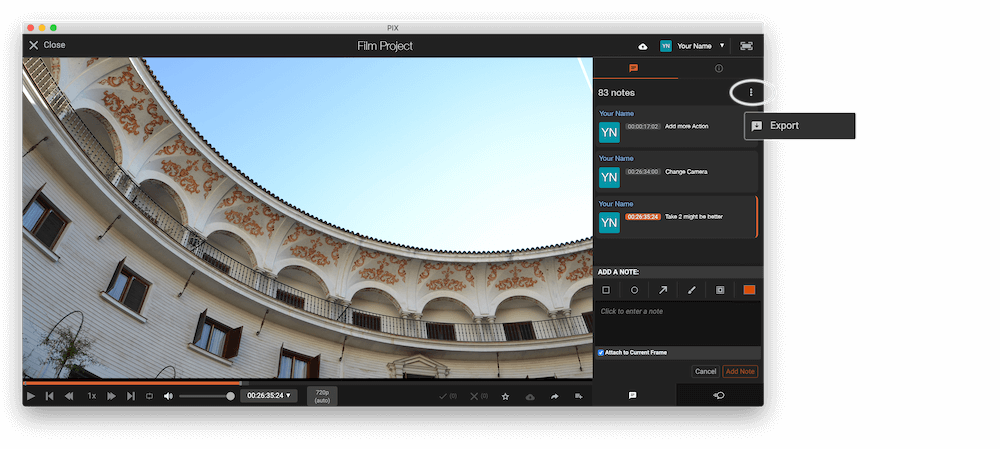
The timecode in Pix starts with 00:00:00:00 for each clip, so you may need to use the offset function on EditingTools.io to sync it with you timeline or move it manually in your NLE (editing software).
2. Use the "Merkki muunnin" to convert the CSV marker file into a YouTube Chapter Markers (.txt) file
Open the free Merkki muunnin, select "Pix Systems > Comments (.csv)" and set "convert" to "YouTube Chapter Markers (.txt)". Generate and download the file. Jos tiedoston muuntamisessa on ongelmia, voit ottaa yhteyttä ilmaiseen tukeen.
3. Copy Chapter Markers into the video description
Open the generated .txt file. Copy and paste the newly generated markers into your video's description.
🚀 Valmis
Siinä kaikki tällä erää! Jos ohjeesta oli hyötyä, jaa se ja tue meitä. Jos sinulla on ehdotuksia työnkulun parantamiseksi, kerro meille!