1. Export a SRT subtitle file from Whisper Transcription App
To export subtitles from the Whisper Transcription App, go to Export and select "Subtitles" and "SRT" as the format.
2. Use the "Tekstitystyökalu & muunnin" to convert the SRT subtitle file into a Final Cut 7 XML marker file
Open the free Tekstitystyökalu & muunnin, select "SRT" and set "convert" to "Adobe Premiere Pro > Sequence (.xml)". Generate and download the file. Jos tiedoston muuntamisessa on ongelmia, voit ottaa yhteyttä ilmaiseen tukeen.
3. Import the Final Cut 7 XML marker file into Adobe Premiere Pro
To import timeline markers, go to "File -> Import" and select the XML file.
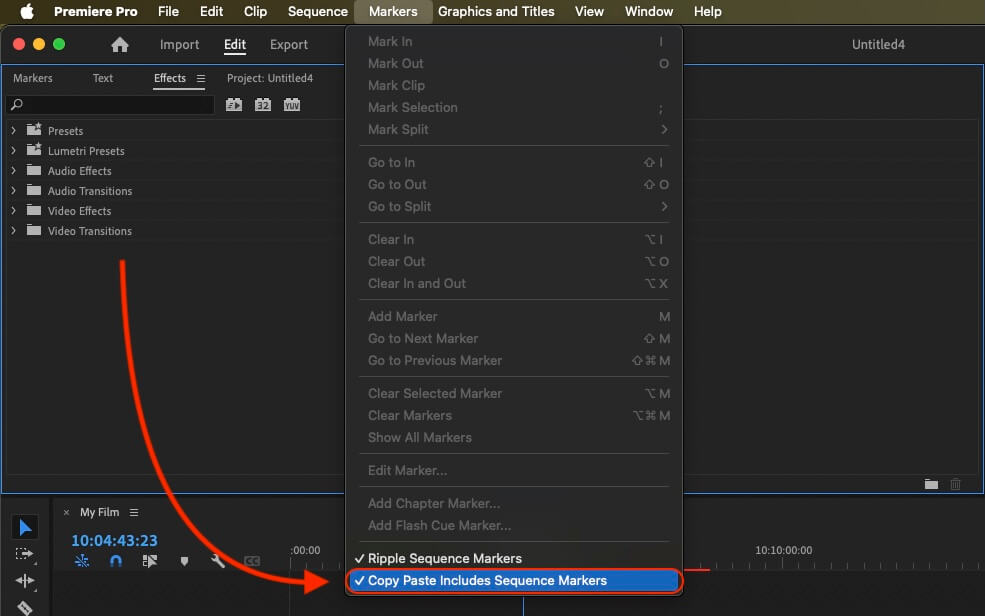
If you want to copy these markers into the existing sequence, use the adjustment layer or any other video as placeholder. Then copy the clip and switch to your existing sequence. Move the cursor to the location, where the adjusmtent layer or first marker appeared in the other sequence. Then past it. It will only copy the timeline markers if under setting (in the Markers menu) the option "Copy Paste Includes Sequence Markers" is active.
🚀 Valmis
Siinä kaikki tällä erää! Jos ohjeesta oli hyötyä, jaa se ja tue meitä. Jos sinulla on ehdotuksia työnkulun parantamiseksi, kerro meille!